K-Store WMS: connect stock, people and automation with clear warehouse visibility.
K-Store WMS: warehouse management software built around your operation
Bring stock, people and automation together with K-Store, the warehouse management system from Keymas. From goods-in and putaway to picking, packing and despatch, K-Store gives your team a connected view of warehouse activity and the tools to keep orders moving.
As order volumes grow and priorities change, accurate information becomes essential. K-Store WMS connects inventory, locations, tasks and operational reporting, helping you reduce unnecessary manual processes, identify exceptions and make informed decisions.
Our warehouse management systems are configured around your products, workflows and existing technology. Whether you operate a manual warehouse, are introducing automation or need software to coordinate a larger integrated system, we help you build the right solution.
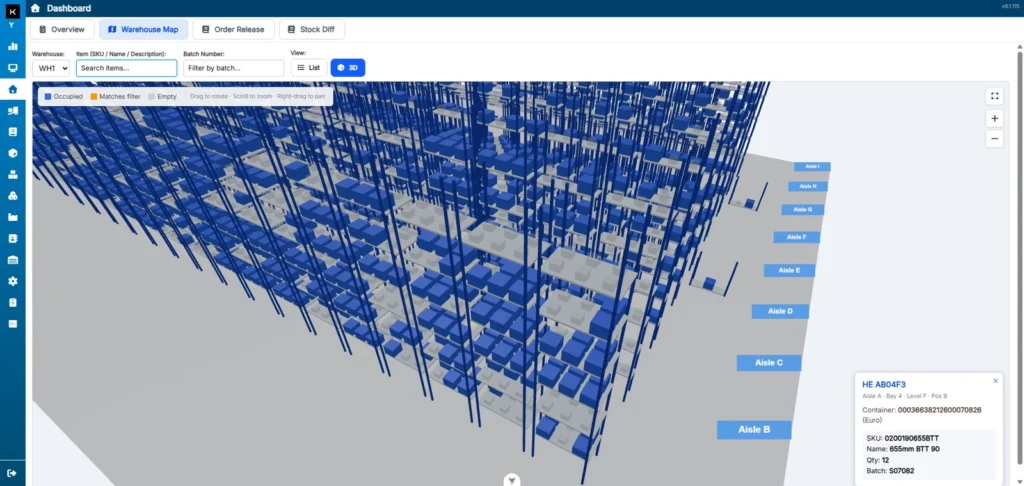
K-Store’s Virtual Warehouse brings your warehouse layout and stock locations into a navigable 3D view. Explore aisles, bays and storage levels, see occupied and empty locations, and put individual stock records in the context of the physical warehouse.
Search by item or batch to highlight matching stock, then select a location to review its contents. The map makes it easier to understand where products are stored and helps teams investigate availability and location queries without working through disconnected lists.
3D warehouse mapping: rotate, zoom and explore your storage layout.
Stock and location visibility: distinguish occupied and empty positions at a glance.
Item and batch searches: locate stock and review quantities and container details.
Where you store stock affects how far your team travels, how often pick faces need replenishing and how efficiently orders move through the warehouse. K-Store’s predictive slotting helps you plan stock placement around demand and warehouse activity.
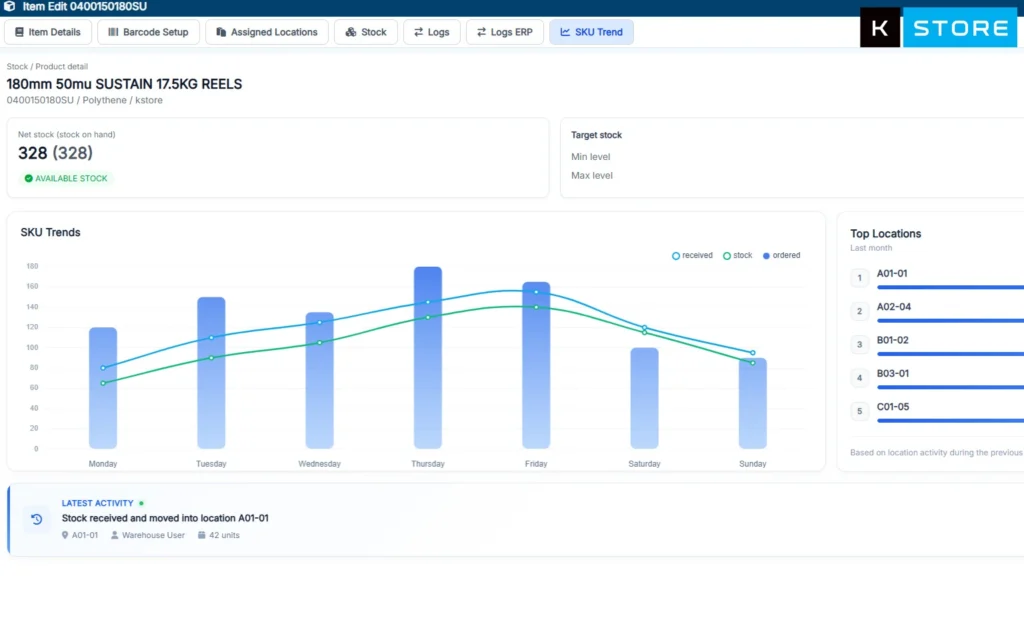
SKU trend information brings receipts, stock levels and orders together, with visibility of the locations used by each product. This supports decisions about which items should be closer to picking areas and which storage assignments need reviewing as demand changes.
Understand product demand: review SKU trends alongside available stock.
Review pick locations: identify opportunities to improve access to frequently picked products.
Plan replenishment: use stock and order information to support more effective pick-face management.
Combine these insights with the Virtual Warehouse to understand both product activity and its position within your operation.
Picking control: know what needs attention
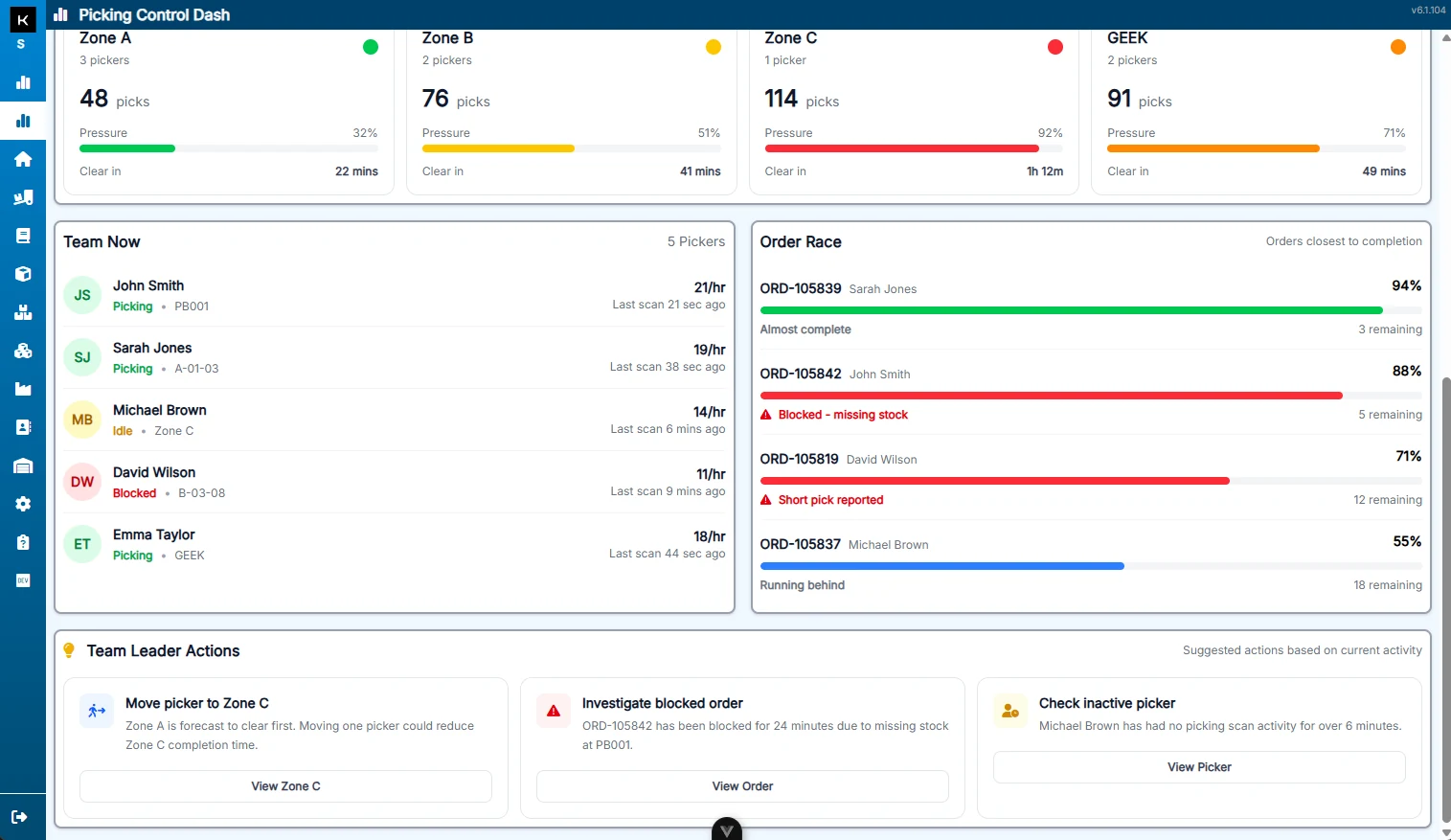
K-Store’s Picking Control Dash gives team leaders a live view of workload, picker activity and order progress. See pressure across warehouse zones, follow work in progress and identify blocked orders or stock exceptions that need action.
Rather than relying on a total order count, managers can review the situation by zone and by team member. Suggested actions help focus attention on overloaded areas, missing stock and inactive pickers, supporting practical decisions during the shift.
Compare picking workload and pressure across zones.
Follow team activity and orders approaching completion.
Spot blocked orders, short picks and stock issues.
Review suggested team leader actions in the context of current activity.
K-Store Picking Control Dash · Select the screenshot to enlarge.
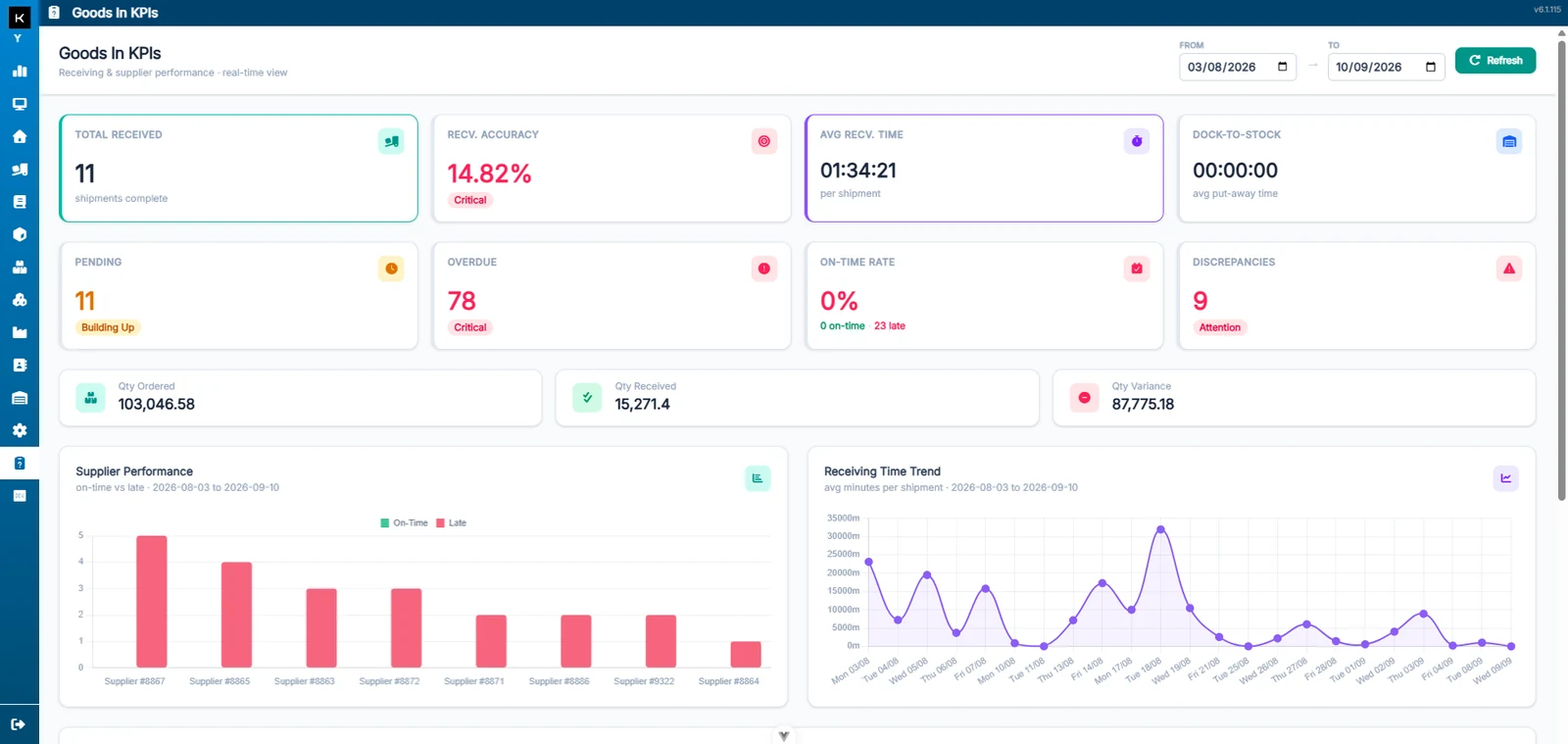
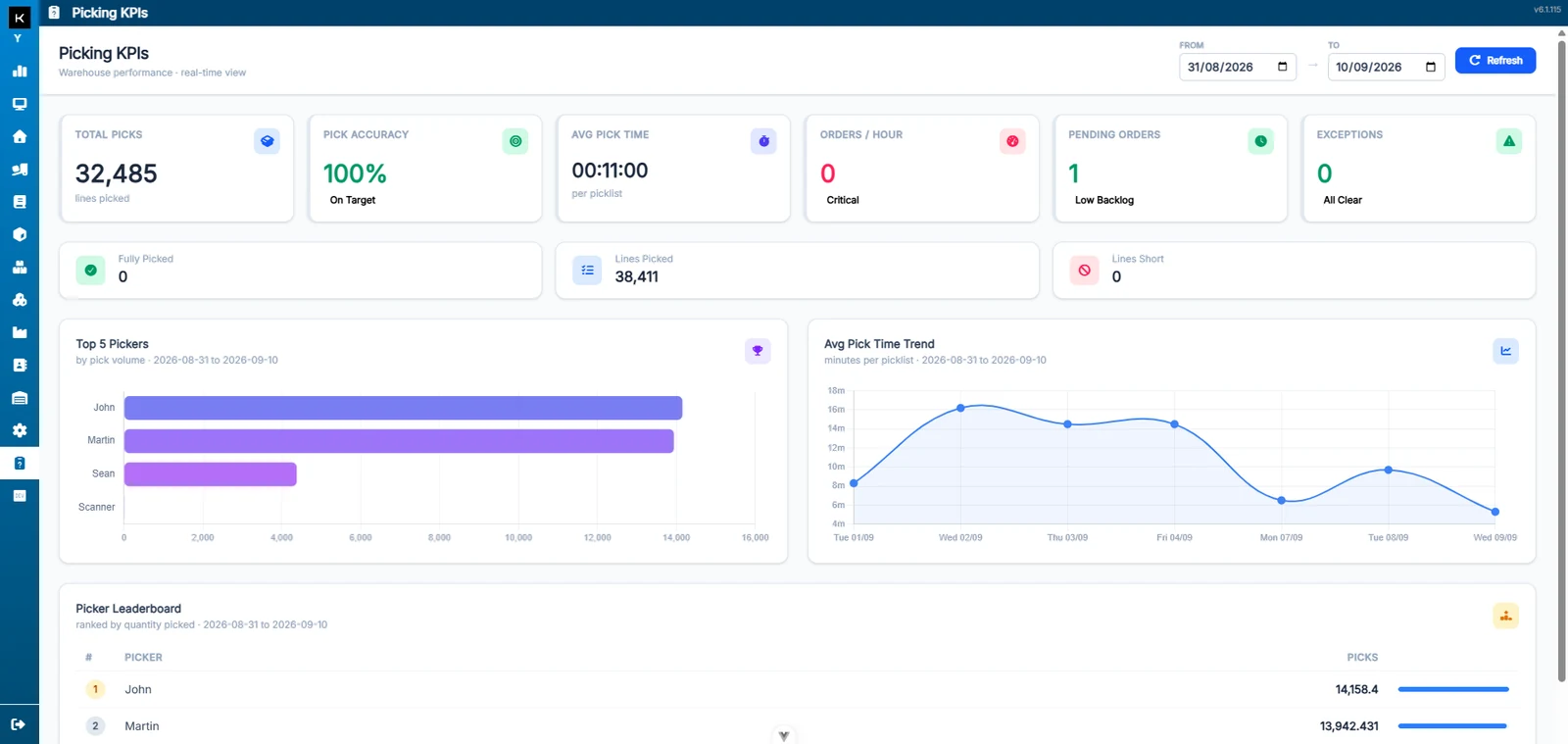
Bring warehouse performance into view with K-Store’s goods-in and picking KPI dashboards. Review activity over a selected date range, compare trends and investigate exceptions using the same system that manages the work.
Goods-in performance
Track receipts, receiving accuracy, average receiving time and dock-to-stock time. Review pending and overdue work, discrepancies and supplier performance to understand what is affecting the flow of incoming goods.
K-Store Goods In KPIs · Select the screenshot to enlarge.
Picking performance
Review total picks, pick accuracy, average pick time, orders per hour, pending orders and exceptions. Picker comparisons and pick-time trends help you understand changes in performance and where to investigate further.
K-Store Picking KPIs · Select the screenshot to enlarge.
Screenshots show example operational data. Features, dashboards and integrations are configured around your warehouse requirements.
One WMS for the complete warehouse process
K-Store connects the stages of fulfilment so your team can follow stock and work from arrival to despatch. Select the functions that support your operation, with room to develop as your warehouse grows.
Goods-in and putaway: manage receipts, advance shipping notices, barcode scanning and movements into storage.
Inventory and stock control: maintain visibility of stock availability, locations, batches and movements.
Picking and replenishment: coordinate tasks and priorities to keep order fulfilment moving.
Packing and despatch: connect labelling, staging and the final stages of fulfilment.
Operational reporting: review workload, activity and exceptions alongside warehouse KPIs.
Connect K-Store to your business and automation
A warehouse management system works best when it connects with the rest of your operation. Keymas brings software and automation expertise together, integrating K-Store with ERP and business systems, eCommerce platforms, carriers and warehouse equipment.
We can coordinate software with conveyor systems, sortation, AMRs, robotics, automated storage and goods-to-person processes. The scope is planned around your equipment, operational requirements and project goals.
Every warehouse has different products, processes and priorities. We take time to understand your operation, configure K-Store around your workflows and plan the implementation with your team.
From integration and installation to ongoing support and optimisation, Keymas helps you develop a warehouse management solution that fits your business today and supports its next stage of growth.